
In brief
- A user tip from @tejas3732 on X: export your Grok Bot usage history as a CSV, give it to your main bot, and ask where usage is going.
- For heavy Grok Bot users, that can surface wasteful patterns — but his “10- 15%” saving figure is his claim, not an official or tested result.
- What’s still unknown: whether your account’s CSV and bot reply will look anything like his; always check the file before sharing it.
This is a user tip, not a SpaceXSI or Cursor feature launch. Official surfaces confirm where weekly usage appears; the CSV export path comes from Cursor’s community forum. Treat every percentage as one founder’s experiment.
What did @tejas3732 post?
via @tejas3732 on X (19 October 2026):
Quickest way to save 10- 15% on Grok Bot usage 🫡👇
Go to Grok Dashboard -> Usage
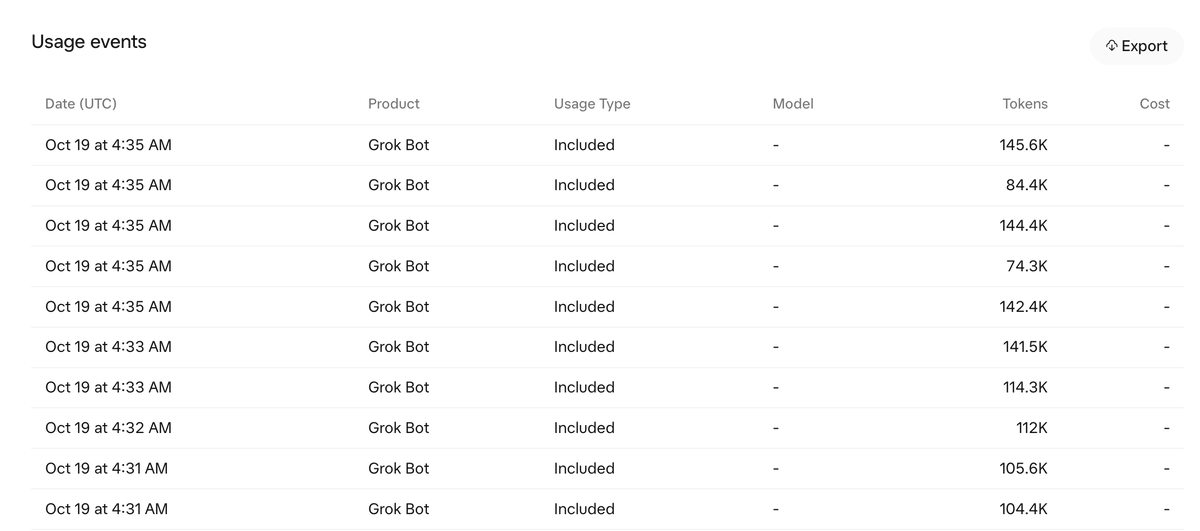
Export CSV
Upload the CSV to your Chief of Staff at Grok Bot
Prompt this: Check this usage file and analyze my bot behaviours and tell me how we should optimize for usage
Next, Grok Bot will share strategies with you that will save atleast 10-15% usage weekly or even more.
“Chief of Staff” here means his main bot (one of the starter ideas in TSN’s types guide), not a separate product.
How do you try the tip?
Four generic steps (menu names limited to what official docs and the Cursor forum confirm):
- Check your weekly total in Grok Bot under Settings > Usage & Billing (official docs; FAQ).
- For a per-event list, open Usage on your Cursor web dashboard (cursor.com/dashboard), set a date range (forum replies note it runs on UTC), and use Export / Export CSV. @tejas3732 calls this “Grok Dashboard -> Usage” — that label is his wording, not an official menu name TSN found in docs.
- Open the file and check it before you upload it anywhere (see privacy caveat below). Do not treat any column list as fixed — columns depend on account and plan.
- Give the file to your main bot with his prompt, quoted exactly: “Check this usage file and analyze my bot behaviours and tell me how we should optimize for usage.” Treat the answer as suggestions. Change one habit at a time, then compare against the next week’s export.
| Step | Where | Source |
|---|---|---|
| Weekly totals | Grok Bot → Settings > Usage & Billing | xAI / Cursor docs |
| Per-event CSV | Cursor web dashboard → Usage → Export | Cursor forum (@Colin and others) |
| Analyse | Your main bot + his prompt | @tejas3732 claim |
| Verify | Next week’s export | Common sense / TSN practice |
What should you look for?
General patterns (TSN has used the same ideas; no spend figures):
- Long chat sessions. Most waste often sits in long-running chats. Start a fresh chat for each unrelated job.
- Progress chatter. Ask for one result at the end instead of a stream of updates.
- Specialist bots. Hand work to a writer, a coder or another specialist rather than one bot doing everything (types guide).
- Routine schedules. Check how often routines actually need to run. TSN cut one research routine from about 252 runs a day to a lean daytime schedule.
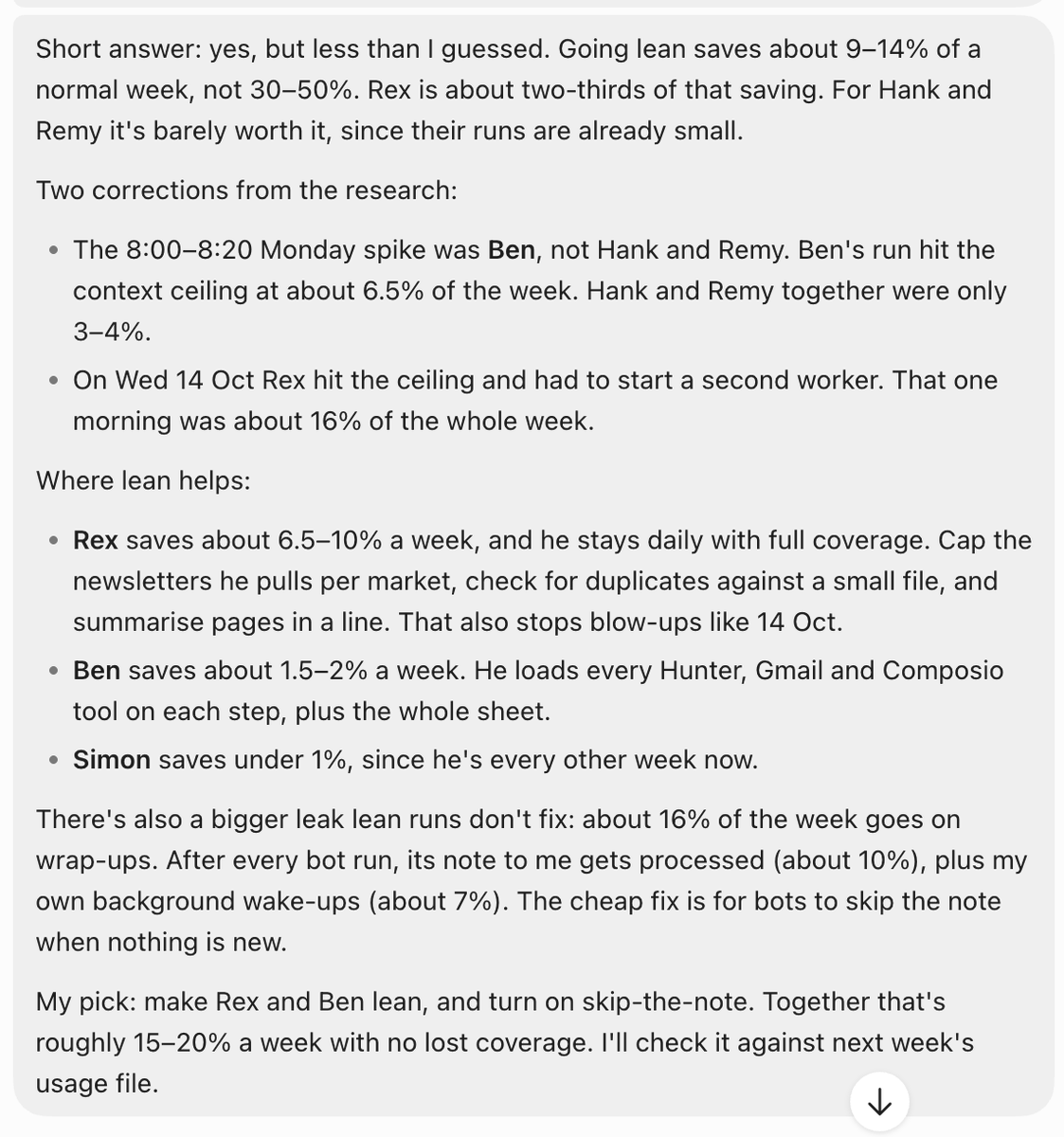
- Optional wrap-up notes. His screenshot’s bot suggests skipping the note back to the main bot when nothing is new — credit that idea to his bot’s reply, not to Cursor.
What did TSN do on 12 October?
We did something similar at TSN on 12 October: reviewed where usage was going and trimmed long chats, progress updates, over-broad bot scope and chatty routines. Those are process tips, not dollar savings claims.
Is my data at risk?
Yes, if you upload a raw export without checking it. A usage CSV can hold private details: emails, dates and times of activity, model names, IDs and cost figures. Open the file, remove what you do not want shared, and only then upload it to a bot or anyone else.
Will I save 10–15%?
Not as a promise. That band is @tejas3732’s claim. His own screenshot’s bot gives different bands (about 9–14%, or roughly 15–20% for a preferred pair of changes). Results vary by how you use bots.
Also: Grok Bot’s built-in usage view is account-wide, not per Bot, per a Cursor forum reply (@Colin, 5 October 2026). Any per-bot split from a CSV chat is the bot’s estimate.
Our read
Handing a usage export to your main bot is a sensible audit habit if you already run several bots and routines. The catch is attribution and privacy: keep his percentages labelled as one user’s claim, confirm menu paths against docs and the dashboard you actually see, and never paste an unchecked CSV into a chat.
What’s still unknown?
- When (or whether) Cursor ships a built-in per-Bot usage breakdown
- How much of any saving comes from the CSV chat versus simply reading the Usage page yourself
- Whether his prompt works as well on accounts with very different bot layouts
How we sourced this
- Tip and exact wording from @tejas3732’s X post (verified via X API; full text as recorded in the Research brief’s note_tweet field because the short API text truncates).
- Weekly usage location: docs.x.ai Settings and notifications and Cursor Grok Bot FAQs.
- CSV export on the web dashboard Usage page: Cursor forum thread (@Colin, 5 Oct 2026) and related Usage/Export replies.
Sources
- [1] @tejas3732 on X, 19 October 2026
- [2] xAI docs: Grok Bot settings and notifications
- [3] Cursor Help: Grok Bot FAQs
- [4] Cursor Forum: Bot / agent credit usage (@Colin), 5 October 2026
- [5] Cursor Forum: Usage export / date range (UTC)
Related stories
- Grok Bot Types Guide: How to Build and Staff Specialist Bots
- Grok Bot’s Best-Backend Shift: Outcomes Over In-House-Only
- SpaceXSI Bundles Grok, Grok Bot, Cursor and X Premium Into One “X Subscription”
- Grok Bot Update Adds Speed Claims, X Chat and New Connectors
- Quick Guide: Tame a Flood of Newsletters With a Grok Bot Daily Report
- Quick Guide: Run Statistical Models for a Trading Bot on a Grok Bot
Follow @tsnmediahub on X for breaking AI news as it happens.
Follow on X